Deep Dive: How uv Resolver Work Between Different Python Versions
Tracking at #17990
How I Met This Problem
I’m maintaining a production GIS system built on Python 3.8.6 with legacy dependencies (e.g., Fiona==1.9.6, Shapely==1.8.4, Rtree==0.9.2). As vscode stopped to support debugger for this python version, I want to develop and debug on Python 3.10.11 with modern packages, and do dry-runs on Python 3.8.6 to test the compatibility.
I met some trouble with this transition, and I did some blackbox test on uv’s resolver. (Sad I don’t know rust.)
The Minimal Reproducible Example
Based on uv 0.10.2 (a788db7e5 2026-02-10)
- Prepare an empty project directory.
- Add an requirements.txt as followed:
1
2
3
4
 rtree==0.9.2
 fiona==1.9.6
 shapely==1.8.4
 h3==3.7.3
Run
uvcommands to init the project with Python 3.8.6:1 2 3 4
uv init -p 3.8.6 uv venv -p 3.8.6 uv add -r requirements.txt -p 3.8.6 --group py386 uv sync
You may find trouble when install Rtree 0.9.2 on windows for lacking spatialindex_c-64.dll or spatialindex-64.dll. Here’s how I solve it before:
- Run
uv pip install rtree==0.9.7 - Find Rtree’s install directory.
- Move or copy the two dlls in rtree/lib to the same directory as Python 3.8.6’s python.exe.
- Run
uv add -r requirements.txt -p 3.8.6 --group py386again.
- Run
- Deleting all packages’ version specification in the requirements.txt, make it look like this (I removed these versions because I want to use modern packages for Python 3.10.11):
1
2
3
4
 rtree
 fiona
 shapely
 h3
Scenario 1
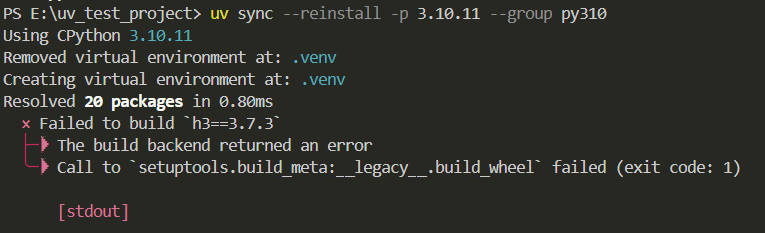
This scenario indicates that uv always try to install same version of package for different groups NO MATTER THEY CONFLICT OR NOT.
Run uv commands switching the project from Python 3.8.6 to Python 3.10.11 to see this scenario:
1
2
3
4
# uv is at Python 3.8.6
uv venv -p 3.10.11
# this comman will try to build h3 3.7.3 for python 3.10.11
uv add -r requirements.txt -p 3.10.11 --group py310
1
2
# use --no-build to avoid h3 3.7.3's build error.
uv add -r requirements.txt -p 3.10.11 --group py310 --no-build

If you run the uv add -r requirements.txt -p 3.10.11 --group py310 --no-sync to make uv change the toml file, it will look like this.
1
2
3
4
5
6
7
8
9
10
11
12
13
14
15
16
17
18
19
20
21
22
23
24
25
26
27
28
29
30
31
[project]
name = "uv-test-project"
version = "0.1.0"
description = "Add your description here"
readme = "README.md"
requires-python = ">=3.8.6"
dependencies = [
]

[dependency-groups]
py310 = [
    "fiona>=1.9.6",
    "h3>=3.7.3",
    "rtree>=0.9.2",
    "shapely>=1.8.4",
]
py386 = [
    "fiona==1.9.6",
    "h3==3.7.3",
    "rtree==0.9.2",
    "shapely==1.8.4",
]

# conflict part wouldn't affect the result
[tool.uv]
conflicts = [
    [
    { group = "py310" },
    { group = "py386" },
    ],
]
Scenario 2
This scenario indicates uv always try to find package’s version that satisfy both group.
Manually changing the toml file as followed will cause uv report the two group are incompatible.
1
2
3
4
5
6
7
8
9
10
11
12
13
14
15
16
17
18
19
20
21
22
[project]
name = "uv-test-project"
version = "0.1.0"
description = "Add your description here"
readme = "README.md"
requires-python = ">=3.8.6"
dependencies = [
]

[dependency-groups]
py310 = [
    "fiona>1.9.6",
    "h3>3.7.3",
    "rtree>0.9.2",
    "shapely>1.8.4",
]
py386 = [
    "fiona==1.9.6",
    "h3==3.7.3",
    "rtree==0.9.2",
    "shapely==1.8.4",
]
Run uv commands switching the project between Python 3.8.6 and Python 3.10.11 to see this scenario:
1
2
uv sync --reinstall -p 3.8.6 --group py386
uv sync --reinstall -p 3.10.11 --group py310

Scenario 3
This scenario indicates uv stops finding same version of package only the two groups are conflicting and with non-overlaping version number, or have specified version markers.
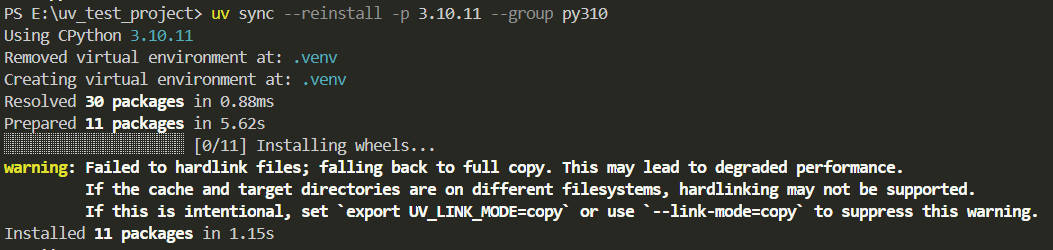
If you modify the toml file like these, uv would install different version of packages to different Python versions. The full copy was caused by installing python and packages in C:/ and creating project at E:/.
1
2
3
4
5
6
7
8
9
10
11
12
13
14
15
16
17
18
19
20
21
22
23
24
25
26
27
28
29
30
[project]
name = "uv-test-project"
version = "0.1.0"
description = "Add your description here"
readme = "README.md"
requires-python = ">=3.8.6"
dependencies = [
]

[dependency-groups]
py310 = [
    "fiona>1.9.6",
    "h3>3.7.3",
    "rtree>0.9.2",
    "shapely>1.8.4",
]
py386 = [
    "fiona==1.9.6",
    "h3==3.7.3",
    "rtree==0.9.2",
    "shapely==1.8.4",
]

[tool.uv]
conflicts = [
    [
    { group = "py310" },
    { group = "py386" },
    ],
]
1
2
3
4
5
6
7
8
9
10
11
12
13
14
15
16
17
18
19
20
21
22
23
24
25
26
27
28
29
30
31
32
[project]
name = "uv-test-project"
version = "0.1.0"
description = "Add your description here"
readme = "README.md"
requires-python = ">=3.8.6"
dependencies = [
]

[dependency-groups]
py310 = [
    # version number overlaping or not wouldn't affect the result
    "fiona>1.9.6; python_full_version == '3.10.11'",
    "h3>3.7.3; python_full_version == '3.10.11'",
    "rtree>0.9.2; python_full_version == '3.10.11'",
    "shapely>1.8.4; python_full_version == '3.10.11'",
]
py386 = [
    "fiona==1.9.6; python_full_version == '3.8.6'",
    "h3==3.7.3; python_full_version == '3.8.6'",
    "rtree==0.9.2; python_full_version == '3.8.6'",
    "shapely==1.8.4; python_full_version == '3.8.6'",
]

# conflict part wouldn't affect the result
[tool.uv]
conflicts = [
    [
    { group = "py310" },
    { group = "py386" },
    ],
]
Run uv commands switching the project between Python 3.8.6 and Python 3.10.11 to see this scenario:
1
2
uv sync --reinstall -p 3.8.6 --group py386
uv sync --reinstall -p 3.10.11 --group py310
Scenario 4
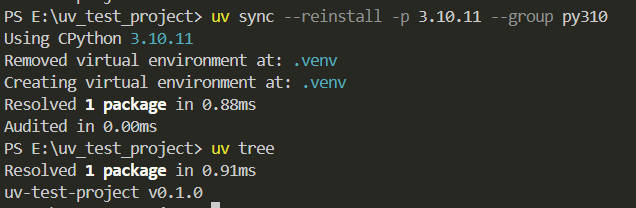
I made a big mistake here. Everyone reading this part should learn a lesson about python_version and python_full_version.
This toml file caused uv installing no package at all because I mistakely used python_version instead of python_full_version.
1
2
3
4
5
6
7
8
9
10
11
12
13
14
15
16
17
18
19
20
21
22
23
24
25
26
27
28
29
30
31
32
[project]
name = "uv-test-project"
version = "0.1.0"
description = "Add your description here"
readme = "README.md"
requires-python = ">=3.8.6"
dependencies = [
]

[dependency-groups]
py310 = [
    # version number overlaping or not wouldn't affect the result
    "fiona>1.9.6; python_version == '3.10.11'",
    "h3>3.7.3; python_version == '3.10.11'",
    "rtree>0.9.2; python_version == '3.10.11'",
    "shapely>1.8.4; python_version == '3.10.11'",
]
py386 = [
    "fiona==1.9.6; python_version == '3.8.6'",
    "h3==3.7.3; python_version == '3.8.6'",
    "rtree==0.9.2; python_version == '3.8.6'",
    "shapely==1.8.4; python_version == '3.8.6'",
]

# conflict part wouldn't affect the result
[tool.uv]
conflicts = [
    [
    { group = "py310" },
    { group = "py386" },
    ],
]
Run uv commands switching the project between Python 3.8.6 and Python 3.10.11 to see this scenario:
1
2
uv sync --reinstall -p 3.8.6 --group py386
uv sync --reinstall -p 3.10.11 --group py310
Summary of the four scenario
Since uv always success when package are compatible between two different python versions, I only list the situations when it’s not. And here is the final test result.
| Versions Overlap | Has Markers | Has Conflict Decl. | Behavior | Scenario | Result With Conflict Packages |
|---|---|---|---|---|---|
| Yes | No | No | Resolve to same version | 1 | Fail |
| Yes | No | Yes | Resolve to same version | 1 | Fail |
| No | No | No | Report incompatible | 2 | Fail |
| No | No | Yes | Resolve to different version | 3 | Success |
| Yes | Yes | Yes | Resolve to different version | 3 | Success |
| No | Yes | No | Resolve to different version | 3 | Success |
| Yes | Yes | No | Resolve to different version | 3 | Success |
| No | Yes | Yes | Resolve to different version | 3 | Success |
It seems that the uv solver’s priorities are like this:
version markersversion overlap(between different dependency-groups)conflict declarations(user defined)
This means the fail in scenario 1 will not just show up when switching Python version, but also appears when the dependency-groups and conflict declarations are both set!
Because when a user defines a conflict to ask for different package versions, the resolver treats the overlap requirement between groups as a higher mandate. It tries to satisfy the overlapping version range first, effectively ignoring the conflict declaration until it’s resolution fails.
My Workaround: The “Multiverse” Strategy
To solve the scenario 1, I implemented a “Multiverse” strategy using NTFS Directory Junctions to physically swap environments. (I didn’t find out scenario 3 when I implemented it, otherwise this article wouldn’t be written.)
Rearrange uv File and directories
First, after running those uv initialize commands, move the files and directories that uv need to a marked directory, make your project space like this:
1
2
3
4
5
6
7
8
9
10
11
Project_Root/
├── .venv386/               <-- 3.8.6's base
│   ├── .venv/              <-- 3.8.6's .venv
│   ├── pyproject.toml      <-- 3.8.6's toml
│   ├── uv.lock             <-- 3.8.6's uv.lock
│   └── .python-version     <-- with 3.8.6 in it
└── .venv310/               <-- 3.10.11's base
    ├── .venv/              <-- 3.10.11's .venv
    ├── pyproject.toml      <-- 3.10.11's toml
    ├── uv.lock             <-- 3.10.11's uv.lock
    └── .python-version     <-- with 3.10.11 in it
Put These Function into Powershell’s profile
1
2
3
4
5
6
7
8
9
10
11
12
13
14
15
16
17
18
19
20
21
22
23
24
25
26
27
28
29
30
31
32
33
34
35
36
37
38
39
40
41
function Set-UvUniverse {
    param (
        [ValidateSet("386", "310")]
        $Version
    )

    $baseDir = ".venv$Version"
    $files = @("pyproject.toml", "uv.lock", ".python-version")

    # 1. check version base
    if (-not (Test-Path $baseDir)) {
        Write-Error "Base $baseDir not exist!"; return
    }

    # 2. clear old *visions* (old links)
    # delete directory junction
    if (Test-Path ".venv") { cmd /c rmdir ".venv" }
    # delete file hard link
    foreach ($f in $files) {
        if (Test-Path $f) { Remove-Item $f -Force }
    }

    # 3. teleporting
    Write-Host "Teleporting into Python $Version universe..." -ForegroundColor Cyan

    # teleport directory, require admin privilege
    cmd /c mklink /j ".venv" "$baseDir\.venv"

    # teleport files
    foreach ($f in $files) {
        $target = "$baseDir\$f"
        if (Test-Path $target) {
            cmd /c mklink /h "$f" "$target"
        }
    }

    Write-Host "Teleport complete! All configurations have synchronized to $Version version." -ForegroundColor Green
}

function uv386 { Set-UvUniverse -Version "386" }
function uv310 { Set-UvUniverse -Version "310" }
Run function to switch between python versions
Run uv386 to switch into python 3.8.6, and run uv310 to switch into python 3.10.11. After you run the command, the project space will look like this:
1
2
3
4
5
6
7
8
9
10
11
12
13
14
15
Project_Root/
├── .venv386/               <-- 3.8.6's base
│   ├── .venv/              <-- 3.8.6's .venv
│   ├── pyproject.toml      <-- 3.8.6's toml
│   ├── uv.lock             <-- 3.8.6's uv.lock
│   └── .python-version     <-- with 3.8.6 in it
├── .venv310/               <-- 3.10.11's base
│   ├── .venv/              <-- 3.10.11's .venv
│   ├── pyproject.toml      <-- 3.10.11's toml
│   ├── uv.lock             <-- 3.10.11's uv.lock
│   └── .python-version     <-- with 3.10.11 in it
├── .venv (Junction)        <-- link to the specified base
├── pyproject.toml (Link)   <-- link to the specified toml
├── uv.lock (Link)          <-- link to the specified uv.lock
└── .python-version (Link)  <-- link to the specified .python-version
Plus
For developers using linux, you can do exactly the same thing using the symlink and hard link.
Benefits
- Zero-Config: Since the IDE (VS Code/PyCharm) is configured to use
.venv/Scripts/python.exe, switching the Junction allows the editor to recognize the new environment instantly without re-configuring the interpreter path. - Only-One-Copy: Only need to copy once when init the project, no more copies like scenario 3 when switching between python versions.
My Proposal
According to the test result and my workaround, I suggest make these improvements to uv.
1. Smarter Resolver: Automatic Bifurcation on Group Conflicts
As user declared two separate groups, we can certainly assume that the user has prediction that these groups are separate to each other, so the resolver should try to assign different package version to different groups instead of failing.
Even if we don’t take this leap of faith, with conflict declarations mark the two groups are conflicting, the resolver should automatically ignore version overlaps between these groups. So, I think in scenario 1, at least when the conflict declarations are set, the resolver should do the same thing as scenario 3.
Which means the uv solver’s priorities should be adjust to this:
version markersconflict declarations(user defined)version overlap(between different dependency-groups)
2. Natively Support Multiple Python Version In One Project
2.1. Named Contexts
Support for named virtual environments, such as uv venv --name py310. This allows users to store multiple environment states without them overwriting each other.
2.2. Filesystem-level Switching
Introduce a command like uv switch <name>. This would utilize Symlinks (Unix) or Junctions (Windows) to re-map the active .venv folder to a specific named context.